

How the Bank of Time (BoT) works:
The Bank of Time (BoT) offers a quick and flexible way to access consultancy support whenever you need it. By pre-purchasing consultation time through your Project Schedule, you can get expert help with ad-hoc questions or smaller projects instantly—without the need for extra paperwork or a new agreement each time.
Time can be used for email support, online or phone consultations, formal reports, or in-person training—whatever suits you best. We usually respond by email to keep things efficient and cost-effective, but we are happy to arrange calls or meetings on request.
How to Add or Use Your Bank of Time:
Go to your Project Schedule and open the Bank of Time (BoT) tab.
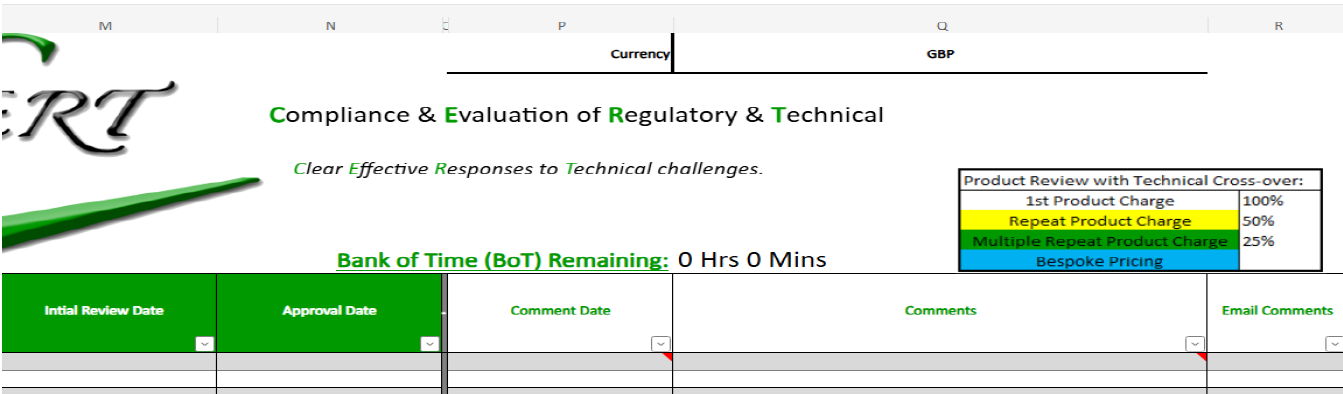
Note: Your Product Schedule may vary in layout depending on the product area you specialise in.
Fill out the yellow columns with the date and amount of time (in minutes) you’d like to add.
Click the Notify or Request Top-Up link. This automatically opens an email—just send it as is or add any notes about your request or enquiry.
Once confirmed, your updated balance will appear in the same tab.

Your remaining balance is always visible on your Schedule, and when it runs low, it is shown in red as a reminder that it is time to top up.
Billing and Flexibility
Time is billed in 15-minute units, rounded to the nearest quarter hour.
Minimum purchase is 30 minutes, with volume discounts available.
Funds must be prepaid and are not a credit facility.
Your BoT time is valid for two years, but extensions can be arranged if needed.
Any unused balance can be refunded or credited towards future work.
After each consultation, we log the time used and update your balance accordingly—so you always have a clear overview of what has been used and what remains.
To arrange a consultation or top up your time, simply contact your consultant directly or visit https://certlabel.com/hello/ to book an appointment online.
The Bank of Time is the easiest way to keep your projects moving forward—fast, flexible, and always on your terms.